The TELRPC Wallet has no internet permission, so there is no network path to your key. Every payment is signed on the phone and leaves as an ordinary phone call.
permissions: phone, camera, biometric unlock and ending its own call
0
internet permissions, so no network path to your key
10¢
per broadcast, from prepaid credit
93
countries with local numbers available, plus a US line
See it in under two minutes.
What TELRPC is, why a phone call is enough, and how your key stays offline the whole time.
A full wallet. Still never online.
Everything below runs on the phone with no internet permission, and every send leaves as a call.
Send to many
Pay a list in one go. Type the payees in, or load a CSV from a USB stick: network, address, amount and a note, one payment per line. Every line is checked and shown before you sign, and the phone places the calls one after another by itself.
Keep separate wallets on one phone, each with its own addresses, and give every address a name you recognise: Main wallet, Savings, Rent.
Fingerprint or face unlock
Open the app with the phone's own fingerprint or face check in place of typing the PIN. The PIN still works, and the check never leaves the phone.
A live balance, by call
Tap Read by call: a short call goes out, the grid calls straight back without ringing, and the balance from the chain lands on screen. A balance read by call uses 1 credit, 10 cents; the balance page at telrpc.com is free.
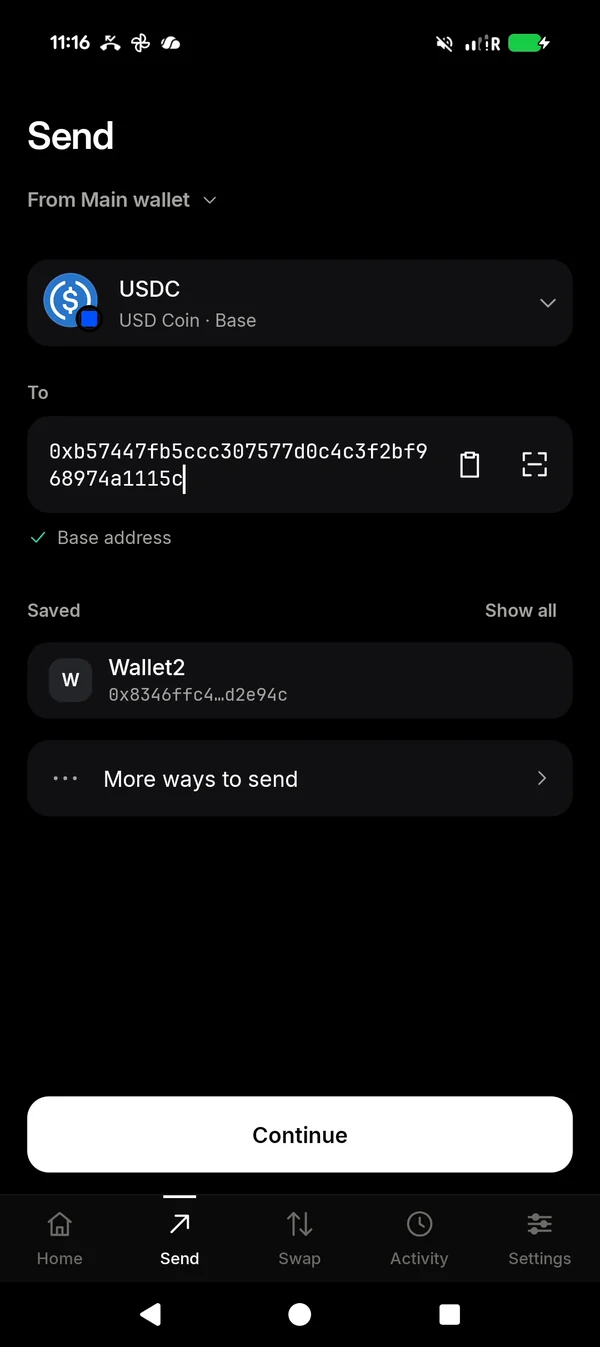
SendAsset, wallet and payee.
AmountOn the keypad.
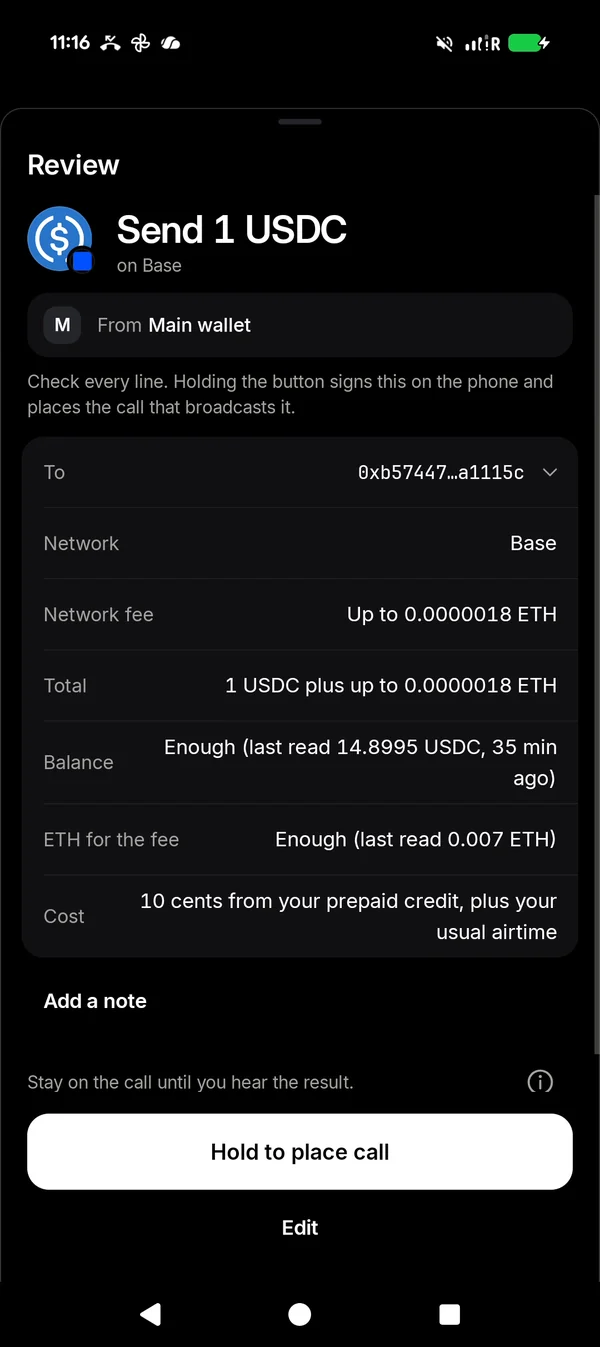
ReviewEvery line, before the call.
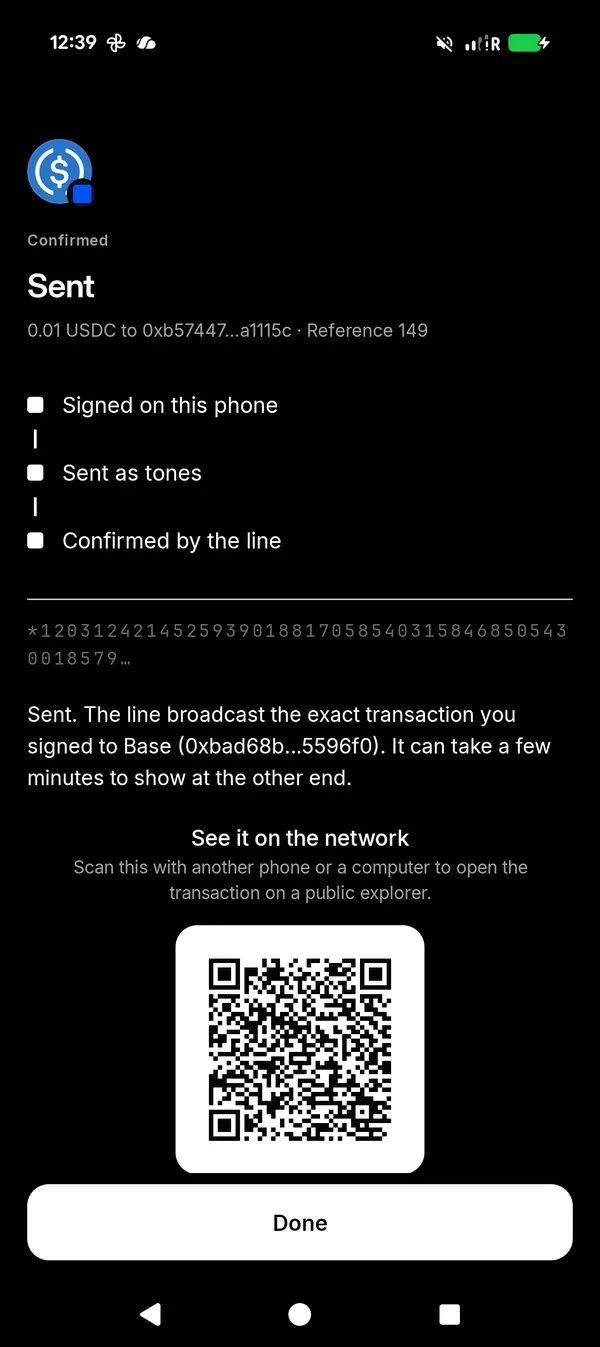
SentConfirmed by the line.
Use your hardware wallet.
Plug it into the phone with a USB-C cable, or show it to the camera. The device signs, the phone sends it as a phone call, and neither the device nor the TELRPC app touches the internet.
Ledger, Trezor and BitBox02 Multiover a USB-C cable
Keystone, Passport and Jadeby QR, with nothing to plug in
In the TELRPC Wallet from version 0.9.17. Your keys stay on your hardware wallet.
1
Connect it
Plug a Ledger, Trezor or BitBox02 Multi into the phone with a USB-C cable, unlock it, and tap Allow when Android asks. A Keystone, Passport or Jade needs no cable: it shows its accounts as a QR code for the phone's camera.
2
Connect a hardware wallet
In the app, tap Add a wallet, then Connect a hardware wallet, and choose yours. Check each address on the device's own screen.
3
Approve on the device
Review a send on the phone, then check it again and approve it on the device. It signs there. A QR wallet scans the send from the phone's screen and shows the signed payment back as a code.
4
Sent by call
The phone carries the signed payment to the chain as an ordinary phone call, and the echo confirms it. No internet in the path.
Your keys stay on the deviceThe private keys never leave your hardware wallet, and TELRPC never needs it connected to the internet. The phone holds only public addresses.
One more walletIt sits beside your other wallets. Balance, Receive, Activity and sync by call all work as before.
Only out to sendYour PIN opens it in the app while the device is unplugged or switched off. Connect or scan it only to send.
The same 10 centsA send is 10 cents of prepaid credit, exactly as from any other wallet.
Supported devices and coins.
Device
Connects by
Bitcoin
Litecoin
Dogecoin
Bitcoin Cash
EVM networks
XRP
Solana
Tron
Cardano
Stellar
Tezos
Ledger Nano S Plus, Nano X, Stax and Flex
USB-C
Yes
Yes
Yes
Yes
Yes
Yes
Yes
Yes
Yes
Yes
Yes
Trezor Safe 3, Safe 5 and Model T
USB-C
Yes
Yes
Yes
Yes
Yes
Yes
Yes
Yes
Yes
Yes
Transfers
Trezor Model One
USB-C
Yes
Yes
Yes
Yes
Yes
No
No
No
No
Yes
No
BitBox02Multi edition
USB-C
Yes
Yes
No
No
Yes
No
No
No
No
No
No
Keystone 3 Pro
QR
Yes
Yes
Yes
No
Yes
Yes
Yes
Yes
Yes
No
No
Foundation Passport
QR
Yes
No
No
No
No
No
No
No
No
No
No
Blockstream JadeAs a Temporary Signer
QR
Yes
No
No
No
No
No
No
No
No
No
No
For Bitcoin and Litecoin on a hardware wallet, sync by call, from version 0.9.18, or sync from telrpc.com/sync with the hardware-wallet option ticked. Change from the wallet's own earlier send needs no new sync.
Bitcoin Cash on a hardware wallet sends from version 0.9.24, on a Ledger with its Bitcoin Cash app or on a Trezor. It syncs the same way as Bitcoin; for the first send, the telrpc.com/sync hardware-wallet option is the quicker way.
EVM networks means Ethereum, Base and the rest of the 36 EVM networks the wallet holds, with their tokens. On a BitBox02 that is native coins and ERC-20 tokens.
On a Keystone, Cardano depends on the device's firmware; if it is not offered, keep ADA in a TELRPC words wallet. Solana on a Keystone uses its first Solana account only. Solana and Tron on a Trezor need its current firmware. Solana on a Ledger needs no blind signing.
Stellar and Tezos on a hardware wallet send from version 0.9.21. A Trezor signs Stellar sends with a time limit. The first send from a Tezos account also publishes its key, a step a Trezor cannot sign yet, so a Trezor Safe 3, Safe 5 or Model T sends Tezos from an account that has already sent once.
Cosmos, TON, NEAR, Nano and Midnight are not on hardware wallets; keep them in a TELRPC words wallet. The Trezor Safe 7 and the BitBox02 Bitcoin-only edition are not supported.
A USB-C cable or the camera, never Bluetooth. The cable option appears on phones that support USB devices (USB OTG), and neither adds an app permission: the cable needs none, and QR uses the camera TELRPC already has.
Ledger, Trezor, BitBox, Keystone, Foundation Passport and Blockstream Jade are trademarks of their respective owners. TELRPC is independent, and not affiliated with or endorsed by any of them.
Watch it done.
A new phone, a cable, twelve words and a phone call. Then every screen of the app, filmed on a real phone.
An example setup
A new phone, a cable, twelve words and a phone call. The setup below, in just over a minute.
How to use the app
Every screen from first launch to a confirmed payment, in just over two minutes.
Rather not use an Android phone? The TELRPC Wallet Kit.
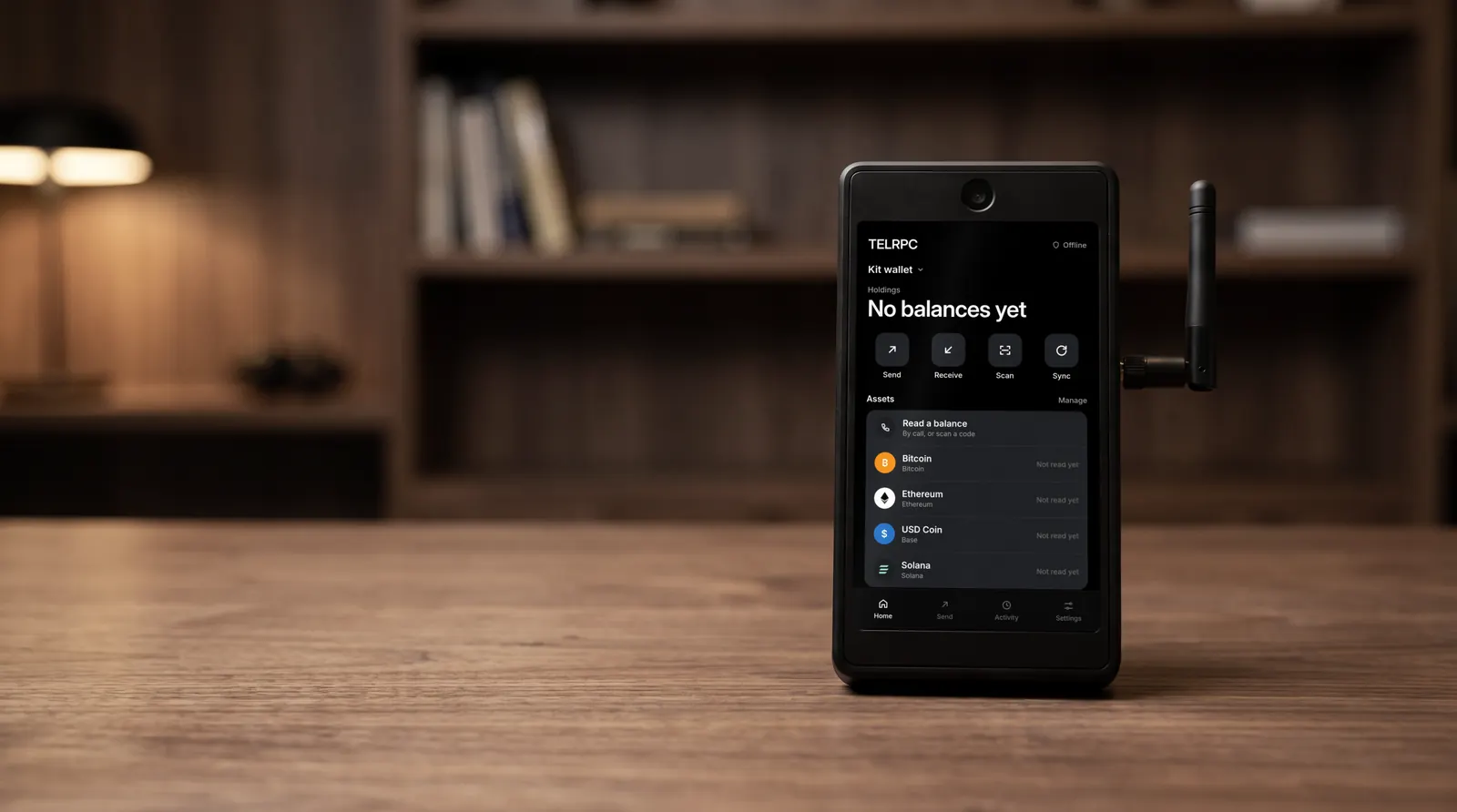
Build your own offline wallet from named parts you can see and check: Raspberry Pi 5, touch display, camera and a 4G voice stick.
$249as a complete kit of sealed parts, or about $200 if you source them yourself.
The safest way to hold and send money with the TELRPC Wallet. It takes about twenty minutes and needs nothing special: a new, basic Android phone that never goes online, the app carried in by cable and checked, twelve words on paper, and payments sent as ordinary phone calls.
Your key is born offlineGenerated on the phone, never on a server, never shown to us.
The phone never goes onlineNo Wi-Fi joined, no data plan, no app store, no account.
You pay with a callThe signed payment travels as tones. The grid holds no keys.
1. Get a new, basic Android phone.
Any new Android phone does the job, and it does not need to be expensive. Insert a SIM for calls. When the phone sets itself up, skip Wi-Fi and do not sign in to any account. Then turn mobile data off and leave it off. From now on the phone only makes and receives calls.
Android 10 or later, so the grid can call back with your confirmation.
A SIM with calls. No data plan needed.
Wi-Fi never joined, mobile data off.
2. Download the app on a computer, and check its fingerprint.
On any computer, download the signed APK. Before you move it anywhere, check that the file is exactly the one we published: run one command and compare the answer with the fingerprint below. If a single character differs, do not install it.
Connect the phone to the computer with a cable and choose File transfer on the phone. Copy the APK into its Download folder and unplug.
On the phone, open Files and tap the APK. Android asks whether Files may install apps: allow it, install TELRPC, then switch that permission off again. No app store, no Wi-Fi, no account. An SD card works the same way.
The exact taps for your phone, and why Android warns you first:
Open TELRPC and tap Create a new wallet. Your key is generated on the phone, and the app shows twelve words once.
Write them on paper, in order. Never photograph them, type them into anything, or keep them on the phone. Anyone with the words controls the funds; with them, you can always recover the wallet. The app then asks for four of the words to check your copy, and offers an optional PIN for opening the app, with fingerprint or face unlock in its place if you want it. A hidden wallet, opened with a passphrase of your own, is in Settings.
Home shows your holdings, with the wallet and account selector at the top. Tap Offline beside Holdings and Android itself lists the app's permissions: CALL_PHONE, ANSWER_PHONE_CALLS, CAMERA and USE_BIOMETRIC, and nothing else. With no internet permission, the system blocks the app from the network for as long as it is installed.
That is four permissions: phone, camera, biometric unlock and ending its own call if the network doesn't. Compare the signing certificate on that screen with the one in step 2. They match. Or tap Scan the authenticity code there and point the phone at the code on this page.
6. Receive funds, and top up before your first send.
Receive shows your address as a code. Show it to whoever pays you. Receiving needs no call, and every chain comes from the same twelve words.
Which network did the sender use?
The same coin travels on several networks: USDC on Base is not USDC on Ethereum. A payment shows only under the network it was sent on, so tell the sender both, for example "USDC on Base", and if one has not shown up, ask which network they used.
Sent on the wrong one? On Base, Ethereum and similar networks your address is the same, so it can often be recovered with the same words on that network. Never guaranteed. More on networks
Sending only works with prepaid broadcast credit, so top up now, before your first send. Each broadcast is 10 cents from that credit, never a percentage of the payment, and so is every other call request: a sync, a balance read, a swap price check, a swap, a token approval or a contract read, charged only when it succeeds. Every fee is shown on the review before you swap. The call itself is ordinary airtime at your carrier's normal rate. In Settings → Broadcast credit the app shows a code; scan it with any online phone or computer, or open telrpc.com/topup and paste your address. Pay by card or with crypto. The wallet phone stays offline the whole time.
7. Send a payment with a phone call.
Tap Send, choose the asset, paste or scan the payee and tap Continue. Enter the amount on the keypad and tap Review. Check every line on the review sheet, then press and hold Hold to place call. That is the moment the phone signs.
The call carries your signed payment as tones: about 95 seconds for a USDC transfer. Stay on the line. Afterwards the grid calls back without ringing, and the wallet checks the confirmation against the payment it signed. If a tone is lost, it redials the same payment by itself; it can only ever land once.
From version 0.9.39, TELRPC can also ask to be this phone's phone app. Say yes and it keys each payment at a steady pace the moment the call connects, and takes the grid's call-backs quietly while a send is on the line, so nothing interrupts it. Your other calls still work on its simple call screen. Say no and everything works as before. Why it asks, and how to switch back
Some chains need a quick sync before a send. One short call does it, and TELRPC asks for it inside Send when it's needed: tap Sync by call (10 cents). The echo is the grid's reply: it calls straight back and carries the value in the caller ID of a call that never rings. An echo sync uses 1 credit, 10 cents; scanning the QR at telrpc.com/sync is free.
8. Put it away.
The phone lives in a drawer and comes out when you pay. The words live on paper, somewhere else. Install nothing else on this phone and never connect it to Wi-Fi.
The wallet app has no way to reach the internet, and a phone with no Wi-Fi and no data gives nothing else on it an internet path either. Your key was born offline, and it stays there.
Lost the phone? Your words bring it all back, and your credit stays with your addresses, so nothing moves. Restore on a new phone
Forgot the PIN? On the lock screen, tap Forgot your PIN? Reset it with your recovery words. If the words match the wallet on the phone, nothing is erased and you choose a new PIN. Words for a different wallet get a warning first, and the wallet on the phone is removed only if you hold to confirm. Reset your PIN
Your key never goes online. Not once.
From first boot to every payment, the only thing that leaves the phone is a signed transaction, carried as tones down an ordinary call.
No internet permission
The manifest declares no internet permission, only CALL_PHONE, ANSWER_PHONE_CALLS, CAMERA and USE_BIOMETRIC, so the operating system denies the app any network access for as long as it is installed. Check it yourself in two taps, on the Verify screen.
A proper key ceremony
Keys are generated on the device, with your own dice entropy if you want it, shown once, and sealed. Carry the app in by USB cable and the phone never needs to go online at all, from first boot onward.
Every major chain, one seed
Every major chain receives on one offline seed, NIGHT on Midnight included, with 144 verified tokens and any custom token you add by contract. Sending is signed offline and broadcast over the call on Ethereum, Base and the rest of the 36 EVM networks, Bitcoin, Solana, Litecoin, Dogecoin, XRP, Tron and Cardano, and from version 0.9.21 on Stellar, Cosmos, TON, NEAR and Tezos, with USDT on Tron, and from version 0.9.24 on Bitcoin Cash and Nano. Coverage
The app, screen by screen.
The screens of the current version. Scroll each row.
Setting up
Set up your walletCreate a new wallet, or restore one from your words.
Twelve words, shown onceWrite them on paper. Blurred here on purpose.
Check your backupFour words, to prove your copy is right.
A PIN, and biometric unlockBoth optional. Fingerprint or face can stand in for the PIN.
A short tourFour cards on how it works. Skip it any time.
Every day
Wallets and accountsTap the wallet name to switch wallets or add an address.
Verify this buildTap Offline. Android lists the permissions: calls, camera, biometric unlock and ending its own call.
ReceiveShow the code. Receiving needs no call.
Broadcast creditAdd credit on Home, or in Settings. Scan to top up from any online device.
Read a balanceBy a short call, or by scanning a code from the website.
SyncOne short call when a send needs it, with other ways underneath. None of them online.
SettingsPIN, biometric unlock, the hidden wallet and broadcast credit.
Sending
SendChoose the asset, the wallet and the payee.
AmountType it on the keypad, then Review.
ReviewCheck every line. Holding the button signs it and places the call.
The callThe payment travels as tones. Number hidden here.
ConfirmedThe grid calls back; the wallet matches the id.
The security ladder.
Choose how far to take it. Every rung keeps your key off the network; each one up removes more of what surrounds it.
Strong: your everyday phone
Install it on the phone you already carry and live your life. The wallet has no internet permission, so Android keeps it off the network however you use the rest of the phone. Every send and every balance read goes by call, and the app itself never reaches the internet. The rest of the phone still goes online, so an attack on the phone itself is the risk the next two rungs take away.
Stronger: behind your hardware wallet
Your key stays in your hardware wallet's dedicated chip, which signs as it always does. Plug a Ledger, Trezor or BitBox02 Multi into the phone with a USB-C cable, or show a Keystone, Passport or Jade to the camera, approve the send on the device, and the TELRPC Wallet carries it to the chain as a call. Use your hardware wallet. Any other signing device or MPC setup can hand over its signed transaction by QR, so no part of the send travels over the internet.
Strongest: the dedicated phone
A phone kept for your money alone. Wi-Fi never joined, no data plan, the signed APK carried in by USB cable. From first boot to every payment the phone has never had a network connection, so there is no network path to your key. This is the setup shown step by step above, and on it TELRPC can be the phone app too, so the grid's call-backs never interrupt a send.
Verify it yourself.
Read the permission list straight out of the published APK with one standard Android tool. The whole story is three lines long.
That is the entire list. Four permissions, and none of them can reach a network: CALL_PHONE places the call that broadcasts a transaction, ANSWER_PHONE_CALLS ends TELRPC's own call if the network forgets to hang up, CAMERA reads a QR code shown on another screen, and USE_BIOMETRIC lets the phone's own fingerprint or face check unlock the app in place of the PIN. There is no internet permission, so the operating system denies the app network access for as long as it is installed. Anyone can run this in seconds, and the Verify screen in the app shows the same list.
The echo adds one thing, and it is not a permission: Android's call-screening role (Android 10 and later), which Android asks you to approve the first time you use the echo. It grants no network access. It lets the wallet read the caller ID of an incoming call and decline it silently, and nothing more.
From version 0.9.39 you can also make TELRPC the phone's default phone app. That is another Android role, not a permission, and it is optional: the list above stays exactly the same. It lets TELRPC key its own calls and show the phone's calls on its simple call screen. It grants no network access. How to switch back
More than a send button.
Everything below runs on the phone with no internet. Anything that moves money is signed on the device and broadcast over the call.
Coins and tokens
Native coins and tokens across the chains the wallet holds, including all 144 verified tokens and any custom token you add.
Token swaps
Swap one token for another without the phone going online, through Uniswap. The price comes back by call, for 10 cents, and a stale price makes the swap revert, never overpay. Every fee is shown on the review before you swap.
Where swaps run
Ethereum, Base, Arbitrum, Optimism, Polygon, BNB, Avalanche, Linea and Blast, for words wallets; hardware wallets do not swap. Pick any token on Uniswap's default and extended lists (2,841), or add a custom token, marked Not verified.
Smart-contract calls
Call a contract function, signed on the device, carried by the call.
Developer tools
In Settings, Advanced: interact with a contract, with a contract read by call for 10 cents, and review your token permissions.
Externally-signed transactions
Sign on a Ledger, Trezor or BitBox02 Multi over USB-C, a Keystone, Passport or Jade by QR, an MPC setup or any device, and let the wallet carry the signed transaction to the chain.
Top up by call
No credit yet? Pay at least $5 of USDC or ETH from the wallet itself, by call, on Base, Ethereum, Arbitrum or Optimism, or USDC on Polygon. The credit is added once the network confirms the payment, and that call uses 10 cents of it.
Speed up or cancel
A coin send on Ethereum or another EVM network with no result after a few minutes can be sped up or cancelled from Activity, for 10 cents. Only one of the two can ever go through.
XRP destination tags
When an exchange needs a destination tag, the wallet asks for it before you send and fills it in from a scanned code. Receive shows your own.
Address book and notes
Save an address with a name from Activity or after a send, and pick it next time. Add a private note to any transaction. Both stay on the phone and come with your CSV export.
Payment requests
Add an amount to your Receive code, so the person paying scans the address and the amount together.
Update notices
After Refresh numbers, Settings shows when a newer TELRPC is out, with a code to scan for telrpc.com/wallet. The phone stays offline.
Sync, balance and confirmation, by echo.
Before a send the wallet needs the account's current sequence and fee level. Scan them as a QR, hear them on a call, type them in, or tap for an echo: the grid calls straight back and carries the value in the caller ID of a call that never rings. Balances and the confirmation after a payment come home the same way, and a lost tone is simply redialled.
Shown before you dial. Never a percentage of a send.
A broadcast costs 10 cents of prepaid credit, and so does every other call request: a sync, a balance read, a swap price check, a swap, a token approval or a contract read, charged only when it succeeds. The 10 cents is shown before you dial and is never taken from a send. Every fee is shown on the review before you swap. There is no TELRPC contract on any chain, and every send pays its own network fee from the account that signs it. The call itself is ordinary airtime at your carrier's normal rate: a local number where one is live (15 countries today, 93 on request), or the US line from anywhere. The QR sync and the balance page on this site are free, and so is asking the line how much credit you have.
The app is signed with TELRPC's own certificate, in the name of Minutes Network FZ-LLC. Phones with an older copy moved to it in place, wallets kept, because our previous key signed the move. Checking an older copy
Permissions
CALL_PHONE, ANSWER_PHONE_CALLS, CAMERA, USE_BIOMETRIC. No internet.
Check it with your phone
Open TELRPC, go to Settings → Verify this build and tap Scan the authenticity code. Point the phone at this code. A copy signed by TELRPC shows Genuine. Signed by TELRPC.
The code holds the signing certificate, file fingerprint and version above, and the app compares them with itself. Nothing is downloaded, and the phone stays offline. An older or newer version still shows Genuine; only a different signature means the copy is not ours. A copy of 0.9.28 or older has its own code.